

Release details
Thanks for being a "Super" user of Superpower ChatGPT. This is a free extension, and I'm planning to keep it that way. That being said, if you are really enjoying the features of this extension or it has made your life easier, and you would like to support its development, here's my PayPal and Stripe link. I appreciate your support!
New features, bug fixes, and improvements
- Folders and reordering 🗂
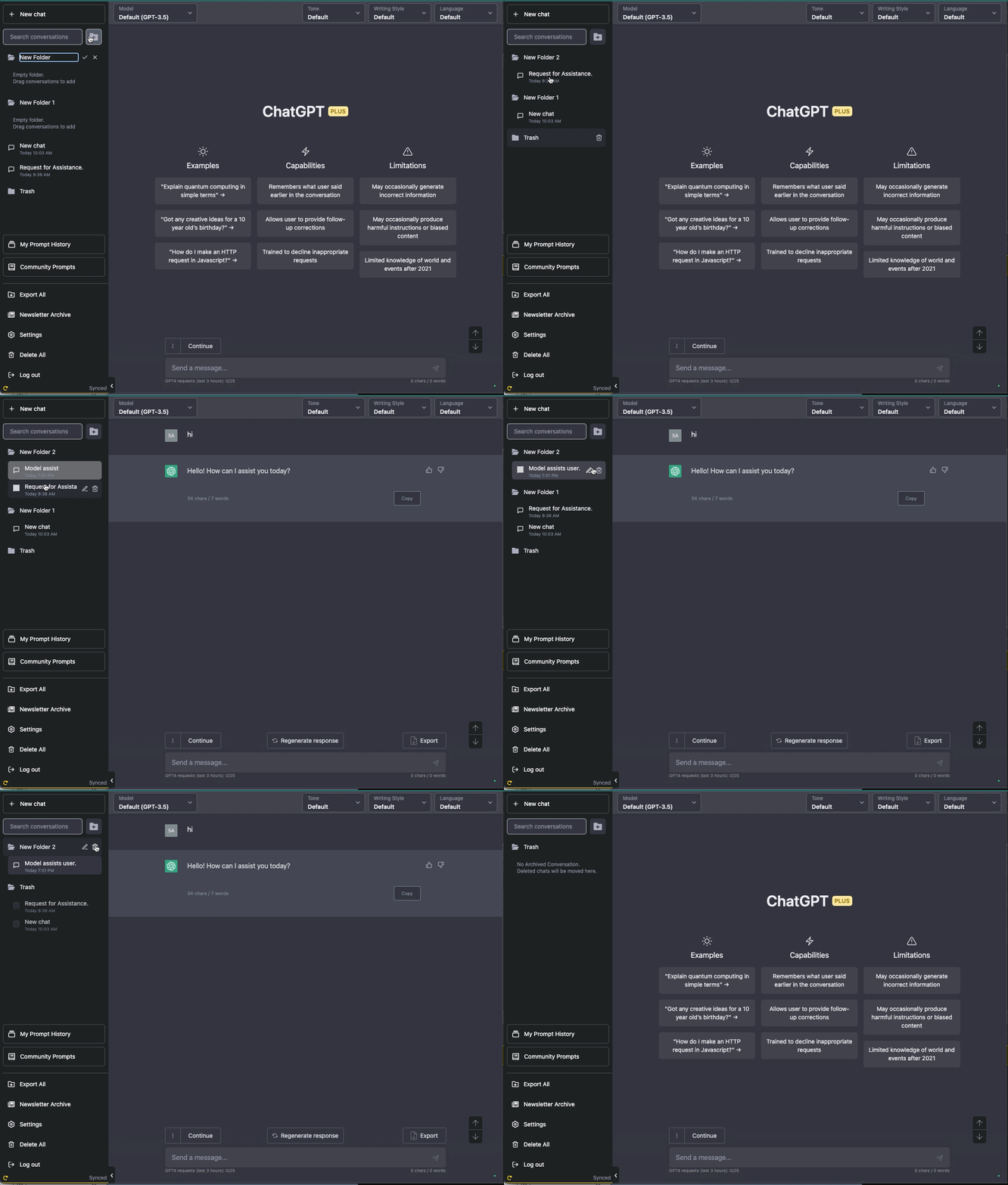
It's finally here. You can now organize your chats into folders, reorder them, delete folders, empty trash, and even drag your chats into the trash to be automatically deleted
Remember, folders and reordering only work when Auto-Sync is on, and all chats are fully synced
- No more scary permissions 👻
I heard your voice. In v3.0.0, I removed a few scary permissions. The permissions that were removed are:
- declarativeNetRequest: This permission was used in the Safe Mode feature to block moderation requests. Starting in v3.0.0, the Safe Mode feature is removed, but the good news is if you have Auto-Sync ON, Safe Mode is automatically OFF by default. So if you don't want to see the red response on some of your chats, just make sure you have Auto-Sync ON
- pageCapture: This permission was used to implement the HTML export. Chrome's warning for this message was so scary that a couple of thousand people uninstalled the extension! I know a small group of users used this feature, but unfortunately, I have to listen to the majority of users and remove this. You can still export in other formats like markdown and convert them to html using other online tools
- managment: This permission was used by me to distinguish between the development and production environment while testing the extension before release. I figured I could remove this and just manually change some lines when testing in development. It makes it a bit harder for me, but I think it's worth it.
I'm also expecting that as a side effect of removing these permissions, the time it takes for the Chrome team to review the extension would hopefully reduce significantly.🤞🏼 We'll find out soon!
- Added short keys ⌨️
I'm slowly adding more short keys to the extension. I will make it easy to find these in the extension once there are a few more. For now, these are what we have:
- cmnd/ctrl + f: If you press this once, it will focus on the History Search input. If you press twice, it will focus on browser search input
- Esc: This will stop the chat from generating
- alt + n: Opens the New Chat page
More short keys are coming soon! Send me your suggestion on our Discord server
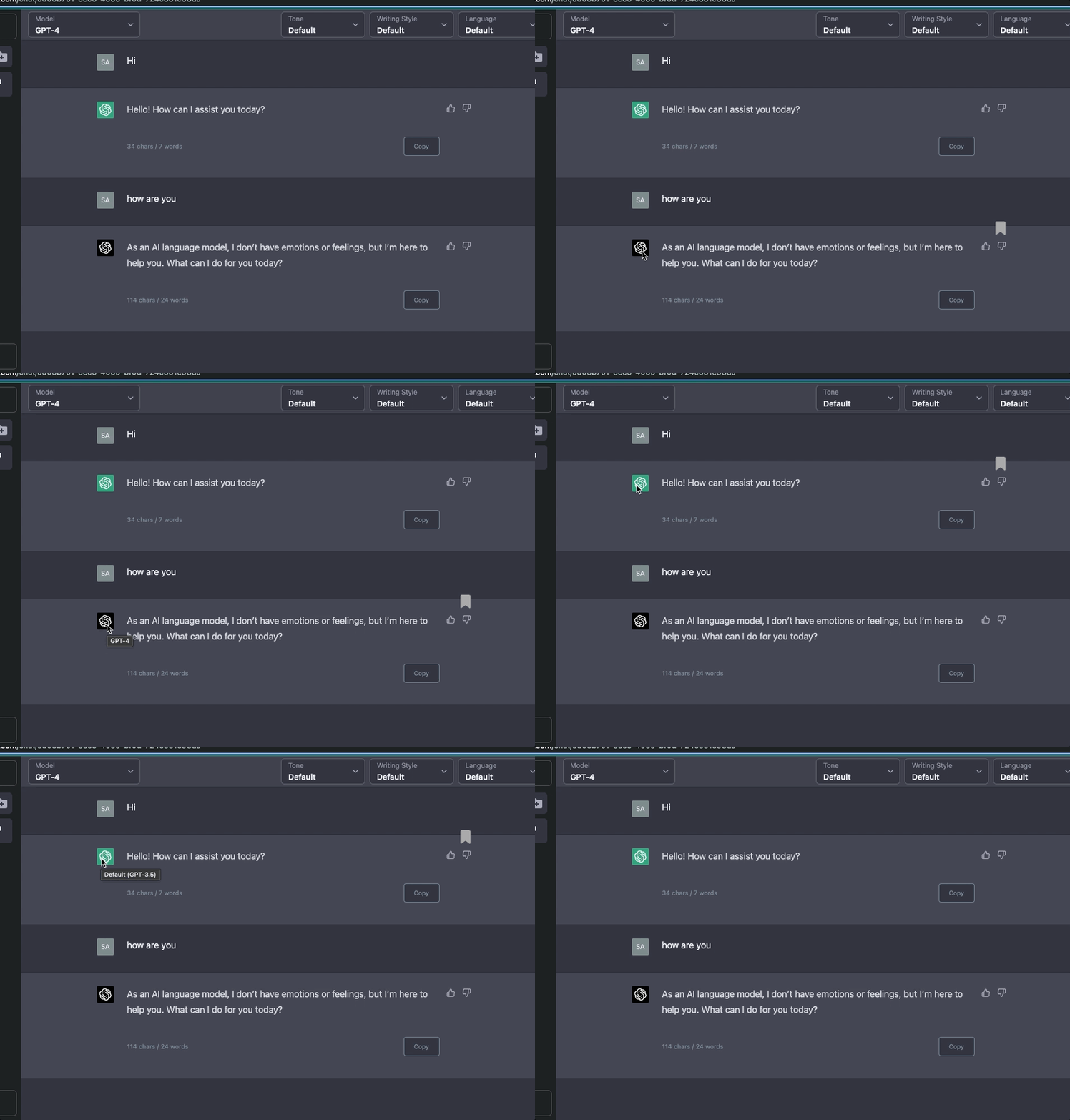
- You could already tell if a response was generated using GPT-4 or not by looking at the color of the avatar(black for GPT-4, green for others). As the number of models grows, this might not be enough, so now you can also hover over the avatar to see the exact name of the model used to generate it.
- Updated the toast colors to match the OpenAI toasts
- Added a second step to reporting prompts to prevent accidental reports
- Fixed a bunch of small bugs and styling issues and improved performance in various places 🐛
Hope you enjoy this new version. As always, I'll be very happy to hear your feedback and suggestions. You can always email me with you suggestions or DM me on Twitter @eeeziii
P.S Have questions about new features? Have a feature request? Want to report a bug? Make sure to check out our recently updated FAQ page, and join our Discord server for latest updates!
P.S.S I'm now accepting sponsors for this extension. To learn more about how you can sponsor this extension visit here.
If you enjoy using this extension, please consider leaving it a review on Chrome Web Store or Mozilla Add-Ons Page.
 Add to Firefox